Oracle Fusion Cloud Procurement 26C introduces a more structured way to bring non-catalogue demand into the procurement process. Intake Requests gives employees a guided entry point for goods and services, then connects the request to reviews, approval, and an outcome such as a purchase requisition or sourcing negotiation.
This article explains the capability through a solution-design lens. It is based on the supplied 26C Intake Requests manual. Any design recommendations are clearly identified as consulting guidance.
Table of contents
- Why Intake Requests matter
- How the process works
- AI-assisted and template-based intake
- Reviews, approvals, and outcomes
- Templates, questionnaires, security, and operations
- Solution architect’s framework
Why organizations need Intake Requests
Noncatalog procurement often begins in too many places: an email, a chat message, a spreadsheet, or a requisition that lacks the information needed for a sound decision. Intake Requests provides a single guided front door and retains the process context as the request moves forward.
| Traditional challenge | Business impact | Documented Oracle response |
|---|---|---|
| Unclear starting point | Delays and inconsistent routing | A guided Intake Requests entry point for noncatalog goods and services |
| Incomplete information | Clarification and rework | Templates and optional questionnaires |
| Disconnected reviews | Limited visibility and longer cycle time | Assigned review tasks with status tracking |
| Manual handoffs | Operational effort and stalled requests | Configured outcomes and intake-manager exception handling |
Consulting perspective: Intake Requests works best as a governed front door to noncatalog demand, not as another form added to an already fragmented intake process.
End-to-end process: from business need to outcome
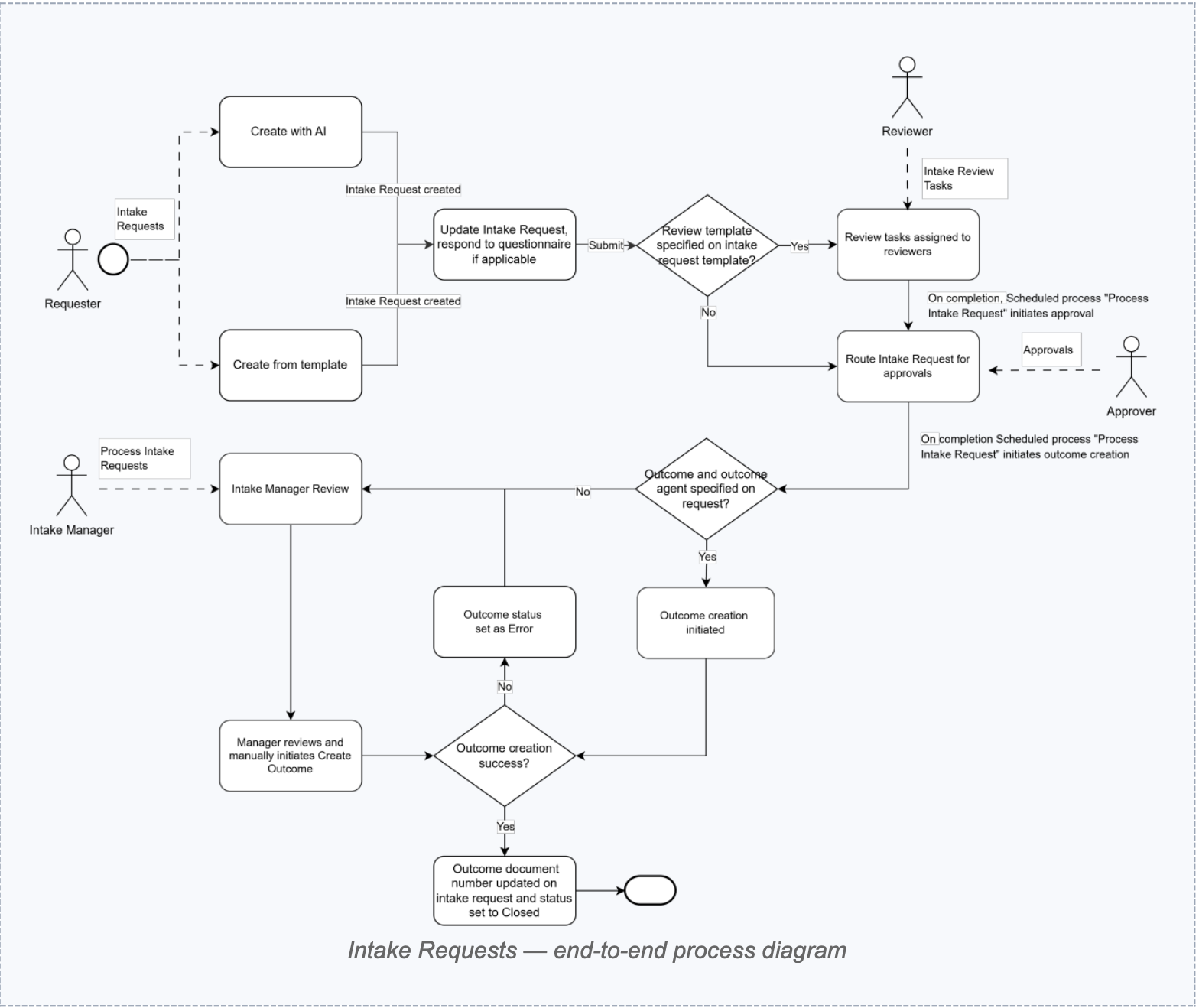
The documented process begins when a requester creates an intake request either with the Intake Request Creation Assistant or from an active template. The requester completes the request and any required questionnaire, then submits it. A review template triggers review tasks; without one, the request proceeds directly to approval. After approval, the scheduled process can create an outcome document.
Business need → Intake request → Reviews → Approval → Outcome creation → Purchase Requisition or Sourcing Negotiation
Documented lifecycle: Draft, In Review, Pending Approval, Approved, Closed, and Rejected or Canceled.
AI-assisted intake: guidance, not approval
From the Intake Requests landing page, the Create action opens the Intake Request Creation Assistant. The requester describes the need in natural language and answers follow-up prompts. The assistant identifies an applicable active template and fills the template fields. The requester then chooses Request Change or Approve. Approving this assistant step creates the intake request in Draft status; it is not the business approval of the request.
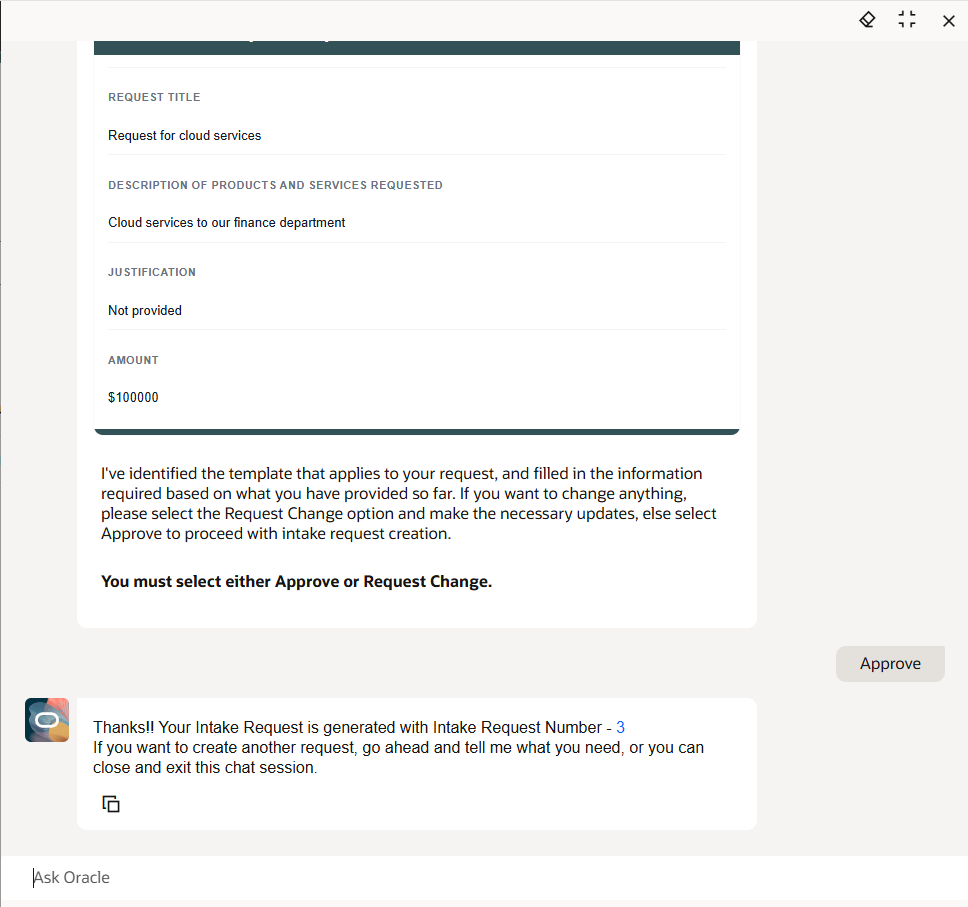
The assistant presents a structured request draft for requester review.
Caption: The assistant presents a structured draft for requester review before the request enters the formal workflow.
“Users describe the business need. Oracle helps structure the procurement request.”
- Reduced training effort for requesters
- Faster creation of a structured draft
- More consistent capture of the information defined by active templates
- Human review remains required before the formal process advances
Requester experience and transparency
The Intake Requests landing page is available as a quick action on the Self Service Procurement home page. It lists requests created by the requester and supports creation and editing of existing requests.
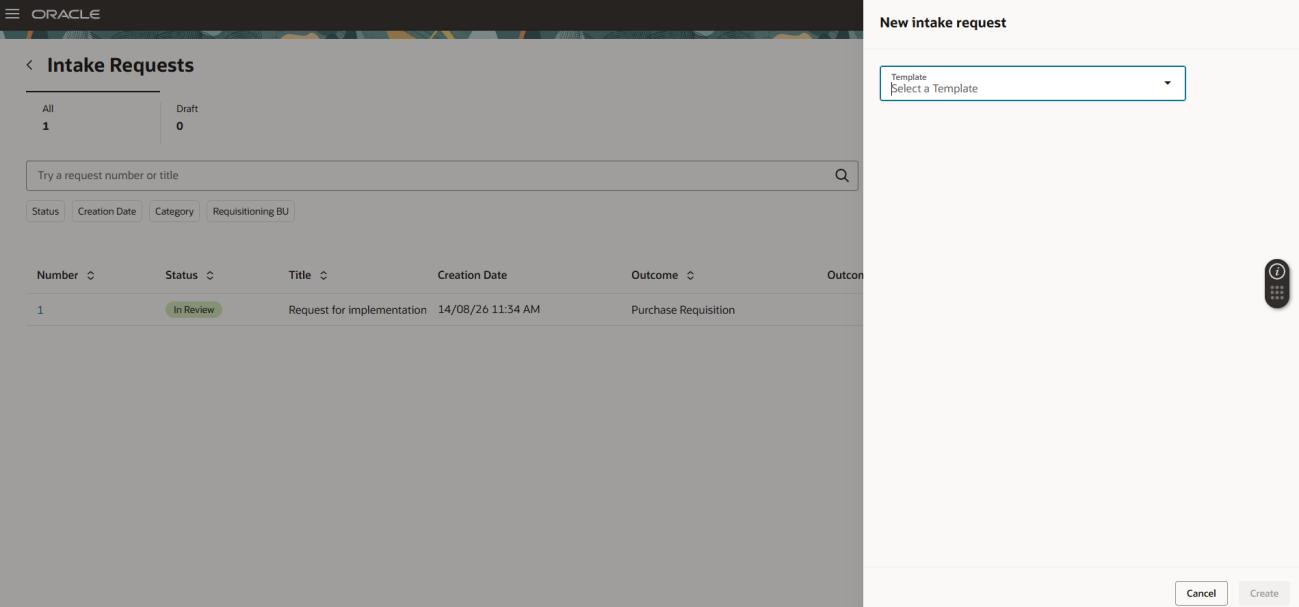
Intake Requests landing page for requesters.
- Create Requests: use the creation assistant or, when enabled, create from a template.
- Save Drafts: Draft requests remain editable and deletable by the requester.
- Track Reviews: View Review Tasks shows completed tasks, assigned reviewers, and the current reviewer.
- Monitor Approval: requests move to Pending Approval after reviews are complete, or directly when no review template applies.
- Monitor Outcomes: a successful outcome creates a link to the resulting requisition or negotiation.
Requester preferences must be set before the first intake request. The documented choices include Business Function, Business Unit, and an optional Deliver-to Location.
Template architecture: design for decisions
Intake request templates are created for a procurement business unit and can optionally be restricted to requisitioning business units. A template must be active to be used and must have an Intake Manager specified before it can be activated. Templates can define defaults, displayed controls, required fields, a review template, an optional questionnaire, and the outcome type.
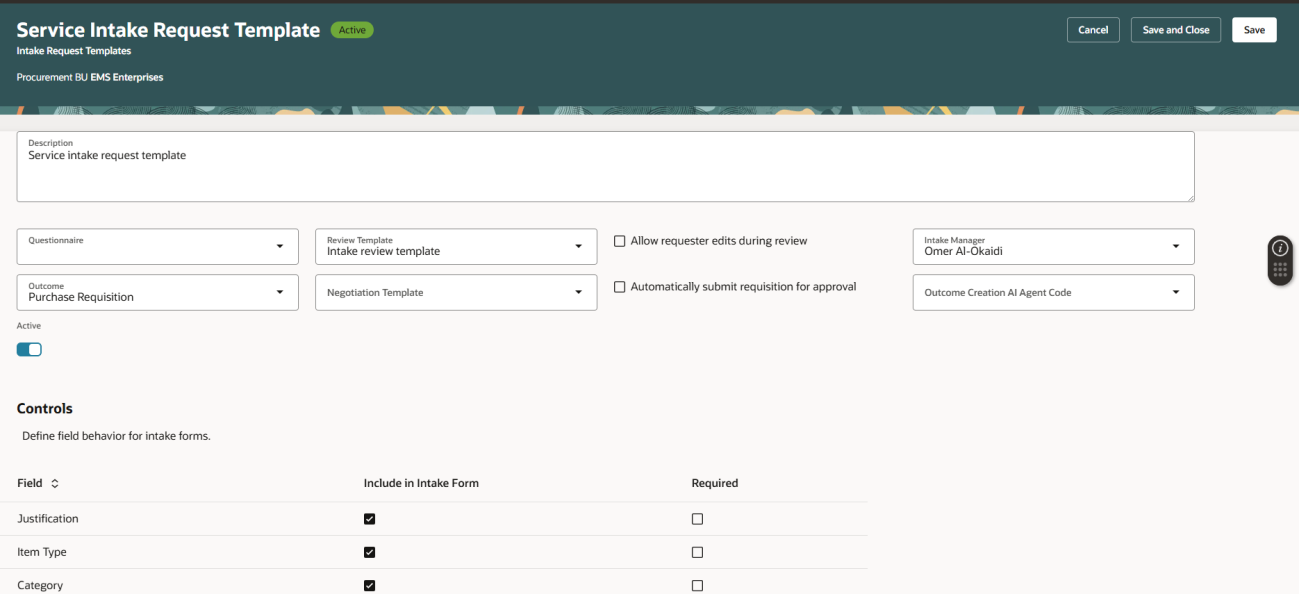
Intake request template controls and defaults.
Documented outcome choices: Purchase Requisition and Sourcing Negotiation. A sourcing negotiation requires a negotiation template. A purchase requisition can optionally be submitted automatically for approval after creation.
Consulting guidance: Design templates around business journeys and the decisions that must be made, not only around procurement categories. For example, use distinct templates for standard goods, services, and strategic sourcing when each needs a different review, data, or outcome path.
Governance through reviews and questionnaires
When an intake request template has an associated review template, submission changes the request to In Review and assigns tasks to reviewers. The manual documents three performer options: Initiator, Specific Person, and Outcome Owner. Supported task types are Manual Task, Questionnaire, and Document. Tasks can be sequenced so that a task waits for its predecessors.
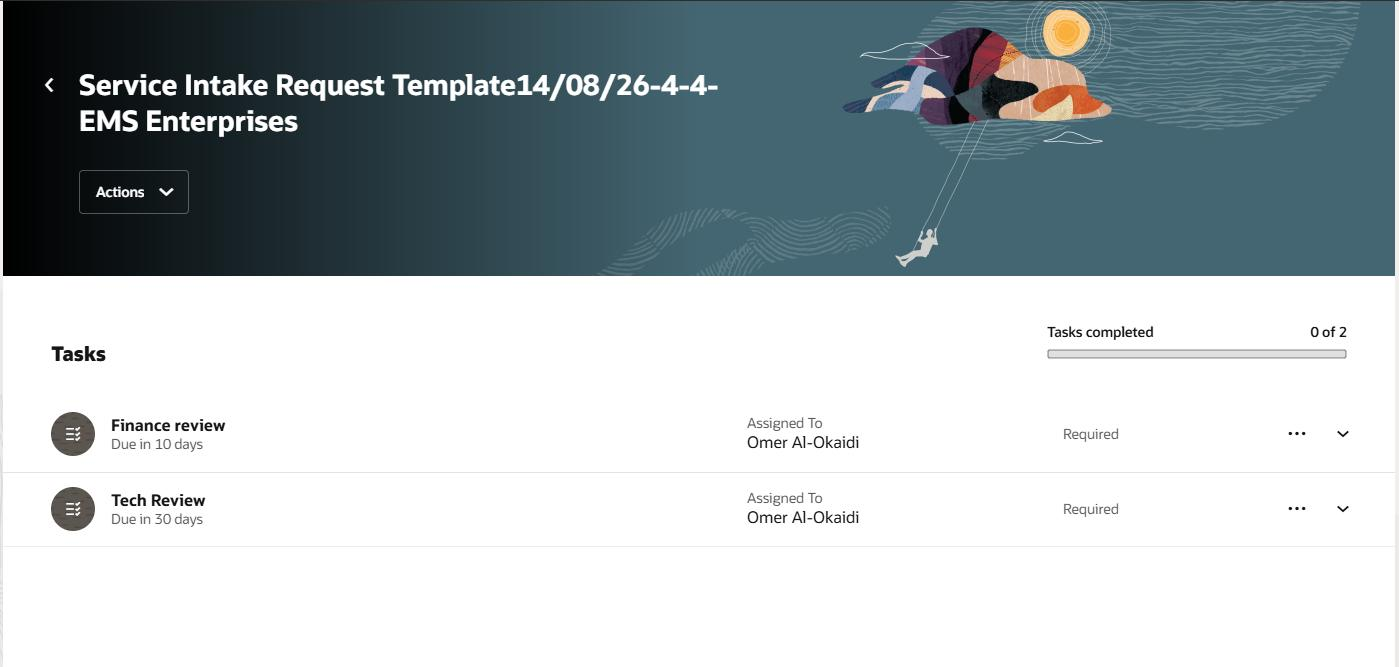
Review task status and progress.
Possible review use cases can include security, legal, finance, facilities, IT, and procurement. These are solution-design examples, not predefined Oracle review tasks.
Questionnaires are optional. The supplied manual documents creation through HCM Questionnaire Templates and Questionnaires, with Procurement Requests selected as the subscriber.
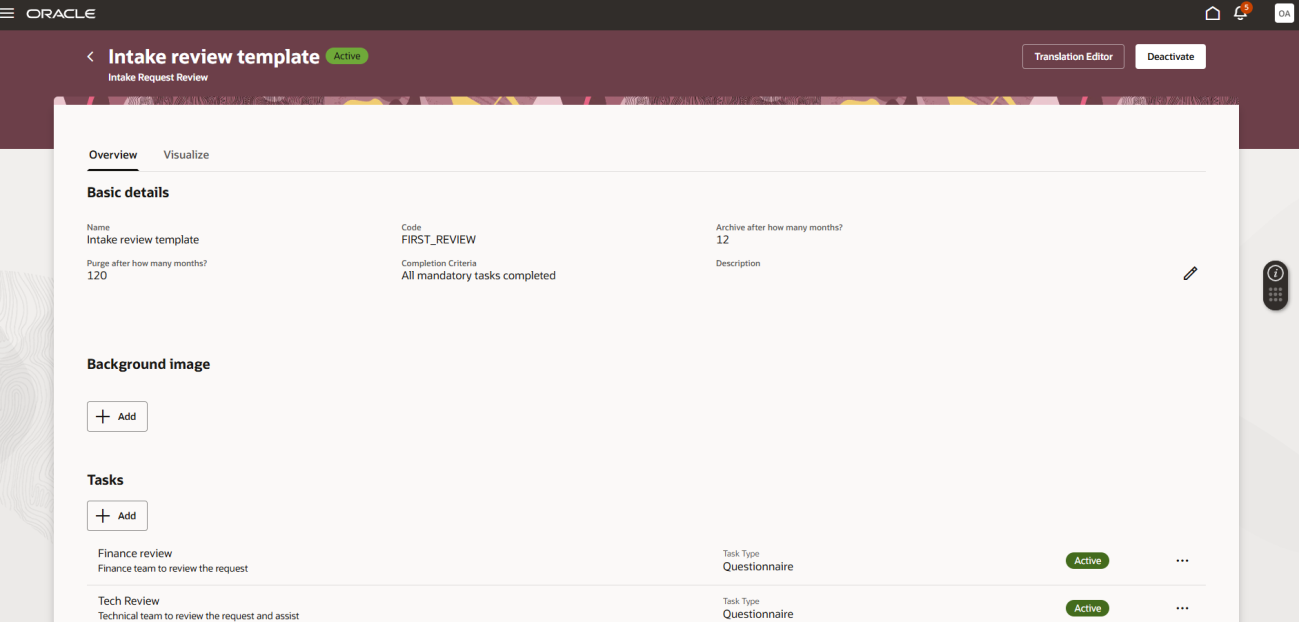
Questionnaire templates and configuration for Procurement Requests.
Consulting guidance: Use questionnaires to collect decision-quality information, such as installation requirements, security assessment needs, supplier information, or legal-review data. Collect only information that changes routing, review, approval, or outcome quality.
Approval, outcome creation, and exception ownership
After reviews are complete, the scheduled Process Procurement Intake Requests job moves requests from In Review to Pending Approval. Approval routing is configured through the ApproveIntakeRequest task in BPM Worklist. When approvals complete, the request moves to Approved and outcome creation is initiated when an outcome is specified.
On success, the requisition or negotiation is created, the outcome status becomes Completed, and the request moves to Closed. If no outcome is specified or an error occurs, the request remains Approved for an Intake Manager to handle manually.
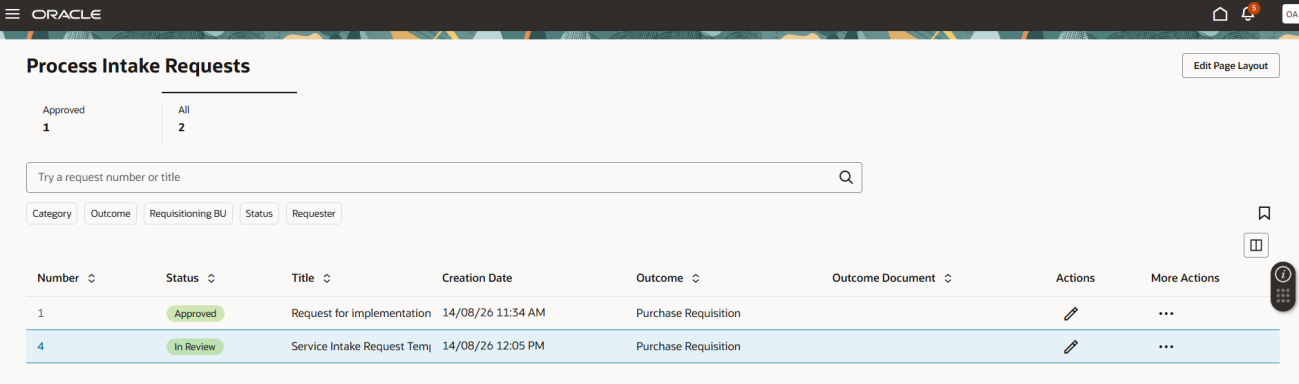
Process Intake Requests page for Intake Managers.
“Approved requests need clear exception ownership when outcome creation cannot complete.”
An Intake Manager can use Create Outcome Document only for Approved requests with no outcome status or an Error outcome status. On failure, an error icon provides details; missing or invalid data can be corrected, while setup issues should be addressed by the procurement administrator.
Enablement and security blueprint
The manual identifies the following implementation essentials:
- Opt in to Intake Requests in the Procurement offering.
- Set ORA_PO_INTAKE_REQUEST_CREATION_AGENT to Intake Request Creation Assistant for AI-assisted creation.
- Optionally set ORA_PO_CREATE_INTAKE_REQUEST_FROM_TEMPLATE to enable creation from a template.
- Schedule Process Procurement Intake Requests to match operational needs.
- Grant Manage intake requests through Procurement Agents for designated intake managers, reviewers, and administrators.
- Configure the ApproveIntakeRequest task in BPM Worklist.
- Create and activate intake request templates, review templates, and optional questionnaires.
- Assign the documented duty roles and required data security policies.
Key roles in the supplied manual: Requester: ORA_PO_INTAKE_REQUEST_MGMT_REQUESTER_DUTY; Reviewer: ORA_PO_INTAKE_REQUEST_MGMT_REVIEWER_DUTY; Administrator: ORA_PO_INTAKE_REQUEST_ADMIN_DUTY. Intake managers require ORA_PO_INTAKE_REQUEST_MGMT_BUYER_DUTY, ORA_PO_PROCUREMENT_REST_SERVICE_DUTY, and, for negotiations, PON_CREATE_SUPPLIER_NEGOTIATION_PRIV.
Solution architect’s workshop framework
| Design area | Key questions to answer |
|---|---|
| Intake strategy | Which business scenarios need an intake path? How should templates be segmented? |
| Data and controls | Which information drives routing, review, approval, or outcome creation? |
| Reviews | Which validations must occur before approval? Who performs each task? |
| Approvals | Which authorization policies apply to the intake request? |
| Outcomes | When should the process create a requisition or a sourcing negotiation? |
| Security | Which configured roles need requester, reviewer, manager, or administrator access? |
| Operations | Who monitors exceptions, scheduled processing, and template changes? |
This framework is consulting guidance for client design workshops.
Five implementation success factors
- Keep the template catalog simple. Start with the few business journeys that genuinely need different data, reviews, or outcomes.
- Use reviews for validation and approvals for authorization. Make the purpose of each control clear to requesters and stakeholders.
- Collect only meaningful information. Required fields should support a decision or a downstream document.
- Define operational and exception ownership. Intake Managers need a clear playbook for Approved requests that cannot create an outcome.
- Design the operating model before configuring technology. Agree ownership, routing, review sequencing, and outcome rules before building templates.
Final thoughts
Oracle Intake Requests can give procurement a governed, visible front door for noncatalog demand. Its value comes from combining guided intake, structured reviews, configured approval, and controlled outcome creation in one lifecycle. The strongest implementations treat the feature as an operating-model design exercise, supported by well-scoped templates and clear exception ownership.
Reference: https://docs.oracle.com/en/cloud/saas/readiness/scm/26c/ssproc26c/26C-ssproc-wn-f46551.htm